


Quick answer
Baymard found that 31% of benchmark sites lacked inline validation in its article’s headline, while 53% did not check card-number plausibility in its input-field research. In a separate usability test, 89% of desktop participants used a phone-number format other than the example shown. Check whether valid inputs pass and whether shoppers can fix invalid ones without losing their place.
Baymard, Usability Testing of Inline Form Validation · Baymard Institute, 8 Recommendations for Creating Effective Input Fields
Key findings and sources
Missing inline feedback in the checkout benchmark
Baymard’s inline form validation article reports 31% of benchmark sites without inline validation in its headline and concluding benchmark passage. The exact applicable site count is not displayed there. This measures a site feature.
Baymard, Usability Testing of Inline Form Validation
Most participants did not copy the phone example
Baymard reports that 89% of desktop participants in its phone-format example test used a different format. This is observed behavior among participants given an example rather than the share of shoppers who abandon.
Baymard Institute, 8 Recommendations for Creating Effective Input Fields
Field plausibility and payment status are different
Baymard’s input-field research reports that 53% of sites did not Luhn validate the card-number input. A checksum screens the input format and does not establish that an issuer will approve the payment.
Baymard Institute, 8 Recommendations for Creating Effective Input Fields
Time to checkout and stated patience use different bases
Stripe and Edgar, Dunn & Company’s 2022 North American report gives an average checkout duration of three minutes and says 52% of surveyed consumers give up after two minutes. The historical report surveyed 216 North American consumers overall.
Stripe and Edgar, Dunn & Company, The State of North American Checkouts in 2022
A guest option may be present and hard to find
Baymard’s dedicated guest-checkout study reports that 47% of benchmark sites allowing guest checkout did not make it the most prominent option. This is a benchmark finding about visibility among sites offering the route.
Baymard Institute, Make Guest Checkout the Most Prominent Option
Clear field requirements and a legible layout are separate audit checks
Baymard’s checkout research reported that 14% of audited checkouts explicitly marked both required and optional fields. In its separate multicolumn benchmark, 16% of sites used extensive multicolumn checkout forms. These percentages describe two site-level criteria, not shopper error rates.
Baymard Institute, The Current State of Checkout UX · Baymard Institute, Form Field Usability: Avoid Extensive Multicolumn Layouts
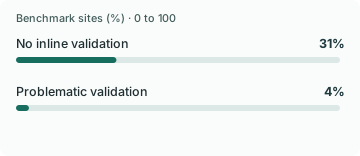
Absent validation dominated the two reported implementation problems
Baymard reported that 31% of audited sites lacked inline validation and another 4% had problematic inline validation. Adding the two categories gives 35% of the audit. Missing validation makes up about 88.6% of that combined rounded share.
Baymard, Usability Testing of Inline Form Validation
Two card-entry audit margins were 19 points apart
Baymard reports 53% of benchmarked sites omitted card-number checksum validation and separately cites 34% that failed to retain card information after a validation error. The reported margins are 19 percentage points apart. They describe distinct site checks and give no site-level overlap.
Baymard Institute, 8 Recommendations for Creating Effective Input Fields · Baymard Institute, How to Audit Your Checkout Flow for Hidden Friction
The unit is a benchmarked site in each publisher-reported audit measure; the public source supplies no shared cross-tab. Subtract the two published margins; do not combine them into a site count.
The inline-validation article uses both 31 and 32 percent
Baymard’s inline-validation article gives 31% lacking inline validation in its heading and closing discussion and 32% failing to provide any field validation in the introduction. The public text does not reconcile the one-point difference.
Baymard, Usability Testing of Inline Form Validation
Published benchmark descriptions in Baymard’s January 2024 article; units are shares of sites. Compare the publisher’s exact phrasing and locations rather than averaging the percentages.
Compare the results
The useful measure is what happens after an error
Baymard reports missing inline validation on 31% of sites in the headline and conclusion of its dedicated article. Its checkout guide separately reports that 98% did not provide the type of adaptive message it recommends. A form can therefore show a message and still leave a shopper unsure how to proceed. A field-level message is valuable when it identifies the exact problem and the next action clearly enough for the shopper to keep going.
Separate invalid inputs that deserve an explanation from valid inputs your store is rejecting. Try a valid phone number with spaces, a local postcode where checkout actually accepts it, and a return to the same form after one deliberate mistake. Record which field rejected the input, when feedback appeared, whether previously entered data was retained where appropriate, and whether the next attempt succeeded. Count corrected errors and completed orders separately so a better message does not get credit for an unrelated change.
Format flexibility and field explanations solve different problems
In Baymard’s desktop phone-field test, 89% of participants used a format other than the example. The format example did not make everyone type in the same way. In another test, 38% stopped progressing at the security-code field. That finding records a point where progress stopped in the usability test and is not a measured abandonment rate among all shoppers.
For a flexible input, accept reasonable equivalents and normalize them before validation. For a genuinely ambiguous field, explain what the field asks for in the checkout itself. A tiny example can help, yet it should not be a hidden requirement that invalidates a number the store could safely accept. If a shopper tells you in a recovery conversation that they got stuck in checkout, ask which field failed and guide them to the secure form. Keep sensitive payment information out of the conversation.
Time the path the shopper actually takes
Stripe and Edgar, Dunn & Company reported a three-minute average checkout in North America in 2022. In the same report, 52% of consumers were described as giving up after two minutes. The study’s duration and the survey response were measured differently. Subtracting two from three yields a one-minute difference between the quoted times. It cannot estimate how many orders would return if a particular checkout were a minute faster.
Use timing as a prompt to locate work the shopper could avoid. Try the existing customer who has an account, the new customer who wants to check out as a guest, and someone whose billing address differs from shipping. Baymard found that 47% of sites offering guest checkout did not make it prominent in the dedicated account-selection article. A route available below sign-in can still be missed before the clock even reaches address entry. Test visible labels and time to the first useful step separately.
Know when form validation ends and payment begins
Baymard reports that 53% of sites in its input-field research did not use a checksum to screen for a plausible card number. Such a check can catch a typo. A plausible number can still fail authentication or authorization. Treating all three as one form error makes it difficult to tell whether a customer needed better field feedback or a different secure payment action.
Create separate checks for field format, authentication completion, authorization outcome, and an order that appears paid. When the data points to checkout design, fix one interaction at a time and keep an outcome for successful correction. Watch for recovery designs that make error counts look better by suppressing messages without helping shoppers proceed. A useful change makes the correct action clearer and leaves the completion path working after an error.
One example of a useful comparison is a store that sees fewer validation warnings after switching from eager feedback to feedback on field exit. Before treating that as an improvement, check the share of shoppers who fix the same error and continue to the next step. If warnings fall while successful corrections also fall, the warning change may have made the problem less visible.
Find out whether the field was misunderstood before it failed
A buyer can fail to complete an address form before any validation rule becomes relevant. Baymard reported that only 14% of benchmarked checkouts explicitly marked both required and optional fields. Its separate multicolumn form research found 16% of sites using extensive multicolumn layouts. These are audit results, not shares of shoppers who made mistakes. They do not show whether the same sites had both issues.
The practical test is to watch what the buyer thinks the field is asking for before looking at the error. A person may skip a required field they believed was optional. They may enter a value in a nearby column intended for another part of the form. Both can look like a validation failure in an event log. In those cases, adding more validation messages after submit leaves the original interpretation problem in place.
Reproduce the flow on the phone the buyer actually uses. Inspect field order, the labels read by keyboard or assistive technology, and what remains in the form after submit. Record whether the user understood the requirement, could locate the field and could correct it without losing prior work. Those observations separate a layout fix from an error-handling fix and give a concrete retest for the next release.
Audit what happens after the shopper fixes the field
A form that waits until submission to flag a mistake creates a different problem from one that interrupts a shopper halfway through typing. In Baymard’s inline validation benchmark, 31% of sites had no inline validation and another 4% had problematic implementations. Together those categories covered 35% of audited sites. Within that combined group, the missing-validation category represents about 88.6% of the rounded benchmark shares. That split gives a team two test cases, even if its checkout already shows a validation message.
Run both cases on a phone. In the first, leave a required field empty and move on. Confirm the error appears when the buyer can act on it, and check whether the interface keeps the input they already supplied. In the second, enter a known bad value, then correct it. The corrected field should no longer read as invalid. Test with keyboard navigation and focus changes too, because timing that works during a slow desktop demo can still interrupt a fast mobile entry.
Record the attempts that had an actual validation error, the attempts where the shopper corrected it, and the corrected attempts that reached payment. Counting the messages shown instead can overweight a single person who saw the same prompt repeatedly. If buyers correct a field and then stop at a payment decline, the form can be doing its job while the next step needs work. The two paths need separate fixes.
Two different places to lose a shopper who makes a mistake
A card field can let a mistyped number through and a payment form can throw away details that the shopper entered correctly. The first issue lets an avoidable mistake travel further. The second raises the cost of a second try. Baymard’s input guidance reports that 53% of benchmarked sites did not use a card-number checksum, while its checkout audit cites 34% that failed to retain card information after a validation error. The two published audit margins are 19 points apart. Their sources provide no joint site-level table, so they cannot tell us how many sites had both problems.
An exact percentage needs a locator. Baymard’s inline validation article says 31% lack inline validation in the headline, takeaway, and closing passage. The introduction also describes 32% as failing to provide any field validation. Since the article gives no reconciliation, use the wording and location that match the claim. Both figures point to a material coverage issue. The one-point ambiguity is too small to decide whether your own checkout requires work.
Measure how often a correction gives the shopper a way forward
Separate the first invalid state from the first visible error and the first successful correction. For example, a shopper typing the last digit of a postal code should be allowed to finish. Once the shopper completes the field or leaves it, a specific message can explain the format and disappear as soon as the input is corrected. Keep safe, unrelated input available so the buyer can continue. Do not store the card security code or record card numbers for analytics.
In a worked merchant scenario, 150 of 1,000 eligible checkout sessions encounter an input error, and 90 of those eventually complete. That is a 60% completion rate among sessions with an error and nine completions per 100 eligible sessions. The first helps debug the recovery path. The second tells the team how much of the whole funnel passed through it. Try at least one mobile wallet and one manual-card route before drawing a conclusion. Issuer declines and authentication challenges need payment-specific status and separate reporting.
Study data
| Measure | Value | Context |
|---|---|---|
| Sites lacking inline validation | 31% | Reported value: 31 % |
| Sites with problematic inline validation | 4% | Reported value: 4 % |
| Measure | Value | Context |
|---|---|---|
| Sites not retaining card information after a validation error | 34% | Reported value: 34 % |
| Lower end of visible-field reduction with billing same as shipping | 30 % potential field reduction | Reported value: 30 % potential field reduction |
| Upper end of visible-field reduction with billing same as shipping | 40 % potential field reduction | Reported value: 40 % potential field reduction |
| Measure | Value | Context |
|---|---|---|
| Sites not Luhn validating card numbers | 53% | Reported value: 53 % |
| Desktop testers using a different phone number format than shown | 89% | Reported value: 89 % |
| Testers who stopped progressing at the security code field | 38% | Reported value: 38 % |
| Measure | Value | Context |
|---|---|---|
| Sites allowing guest checkout that did not make it prominent | 47% | Reported value: 47 % |
| Measure | Value | Context |
|---|---|---|
| Sites not supplying adaptive validation feedback | 98% | Reported value: 98 % |
| Measure | Value | Context |
|---|---|---|
| North American survey respondents described as giving up after two minutes | 52% | Reported value: 52 % |
| Average checkout completion time in the 2022 North American report | 3 minutes | Reported value: 3 minutes |
| Checkout processes slower in Canada than US in the report | 18 % relative difference | Reported value: 18 % relative difference |
| Audited North American checkouts with at least five basic issues | 99% | Reported value: 99 % |
| Measure | Value | Context |
|---|---|---|
| Benchmarked checkouts explicitly marking required and optional fields | 14% | Benchmarked checkouts explicitly marking required and optional fields |
| Measure | Value | Context |
|---|---|---|
| Benchmarked sites using extensive multicolumn checkout forms | 16% | Benchmarked sites using extensive multicolumn checkout forms |
| Measure | Value | Context |
|---|---|---|
| Published alternate estimate for sites without any field validation | 32% | Published source value |
What changes when you compare the figures
| Comparison | Result | Calculation |
|---|---|---|
| Reported average duration minus the survey threshold in seconds | 60 seconds | = 180 - 120 |
| Complement of explicit required and optional field marking | 86% | = 100 - 14 |
| Audited sites with absent or problematic inline validation | 35% | = 31 + 4 |
| Share of the two benchmark problem categories attributable to missing inline validation | 88.5714% | = 31 / (31 + 4) * 100 |
| Difference between the two published validation-prevalence figures | 1 percentage points | = 32 - 31 |
| Card checksum omission minus card-information reset omission | 19 percentage points | = 53 - 34 |
| Published omission of card checksum validation relative to published card information reset share | 1.5588 times | = 53 / 34 |
| Worked scenario, completed checkouts after initial errors per 100 eligible sessions | 9 completions per 100 sessions | = (150 / 1000) * (90 / 150) * 100 |
Methodology and sources
Verified Baymard’s usability and benchmark observations separately from Stripe and Edgar, Dunn & Company’s 2022 historical North American audit and separate survey. For inline validation we use the article’s 31% headline and final benchmark passage. An introductory sentence says 32% for a differently worded field-validation statement, which we do not combine with the headline. Baymard’s item-level audit counts are not displayed beside all figures. Stripe reports 100 audited sites and 216 surveyed consumers overall. Duration, formatting behavior, and feature prevalence have different denominators. The two field reduction endpoints describe Baymard’s example guidance rather than measured effect.
Download the source data (CSV)
Download the calculations (CSV)
Related reading
Cart abandonment statistics and the problems behind them
Return policy checkout statistics and what buyers need to see before paying
Sources and definitions
Baymard Institute, Usability Testing of Inline Form Validation
Baymard Institute, How to Audit Your Checkout Flow for Hidden Friction
Baymard Institute, 8 Recommendations for Creating Effective Input Fields
Baymard Institute, Make Guest Checkout the Most Prominent Option
Baymard Institute, The Checkout UX Guide
Stripe and Edgar, Dunn & Company, The State of North American Checkouts in 2022
Baymard Institute, The Current State of Checkout UX
Baymard Institute, Form Field Usability: Avoid Extensive Multicolumn Layouts
The source data includes the population, period, denominator and limitations for every figure.